
So, I’m sure many of us are individuals who have tried to boost our productivity at least a couple of times. Unfortunately, for some of us, we struggle and land back in our old habits. Now, there’s nothing wrong with that because everyone goes through life differently and certain factors are beyond our control. I know for myself, I’ve been held back a lot because of mental health and fatigue and I often find myself starting something and giving up after a few days. But I try, I guess. This list is essentially just different applications and websites that have helped to maintain at least a minimal stream of productivity as well as helping me to start taking care of myself.
Notion
Notion is a site/application that I came across around last year (I think) and it’s been quite life-changing. Notion is an outlet to be able to organise your entire life from work, studying, general tasks and events and so on. The application is a blank canvas upon which you can add various elements such as calendars, tables, other widgets and there is a great freedom for customisation! You can add images, gifs and change headers sizes, fonts and colours. Below are some Notion tours that’ll give you an idea of how Notion works and how much you can customize it according to your life! Notion also has a feature where you can duplicate templates by other users if the link is provided by them. This can help if you’re unsure of how to structure your Notion ~ If you’re a student, you can use your school/college/uni email to get the pro plan for free!
The two downsides I’ve heard of and come across is that for more features and larger file sizes, you need to switch to a paid subscription and Notion isn’t fully secure in terms of your data, a problem highlighted by harshibar on YouTube. I would highly recommend that you don’t use Notion for very private and personal information, e.g. bank details, locations/addresses, school/college/university IDs, passwords, journal entries with very private info etc.
Obsidian
Obsidian is a note-taking software which saves your data only on your PC without putting anything into a cloud. The text is plain text Markdown so you can add asterisks to make words/sentences bold and dashes to make them italic etc. You create vaults which are saved to your PC and within each vault, you can create folders and individual note pages. I came across this application through harshibar as she presented it as a secure-alternative for Notion. I prefer Obsidian to Word because of it’s smoother and nicer UI and it makes me want to write for once. But since Word is commonly used and preferred when I submit articles, I just copy and paste from Obsidian to Word. The writing experience and better security is what makes Obsidian appealing for me to use. Personally, I still don’t keep anything private in Obsidian either but rest-assured it’s more secure.
Google Calendar
A feature easily accessible if you have a Google account, Google Calendar is something that I wish I had started using sooner. It’s relatively straight-forward. You’re able to:
- create individual calendars which can be colour-coded and labelled, e.g. “Birthdays”, “Work”
- set the duration of the task
- view the calendar in yearly, monthly, weekly and daily formats
- get alerts before a task or event occurs to remind you (if you’re calendar is synced with your phone)! You can also set when you want to receive alerts, e.g. 30 minutes before the task/event
As someone who used to bullet journal and grew tired and annoyed with the system for a few reasons, Google Calendar has been a much more easier and quicker planner system to sort out my days and weeks.
Idenati
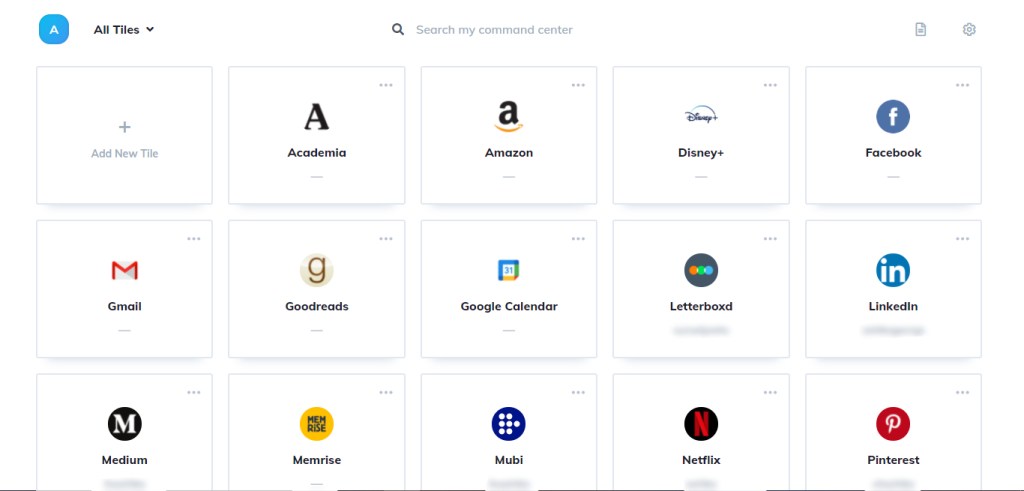
Idenati is a site which allows you to keep and organise the websites you often use in the form of separate tiles. You can sort them by adding tags/categories and star them to add to your favourites so you can filter through them if you wish. I’ve set up Idenati as the first page that appears when I start up Chrome so I can easily find where I want to go and not have to type. Your usernames for each website can also be recorded in order to not forget. The downside is that the free version has a maximum of 20 tiles and for unlimited tiles, you’ll need to have a paid subscription. Idenati also has a feature for each tile to store your passwords for websites. I’m not sure how secure the site is so I haven’t recorded any of mine and I’d probably recommend you don’t too. The site is just great for my daily Chrome use to easily find my top and prioritised websites.
coffeelings
coffeelings is a cute Chrome extension that’s basically a mood tracker. When you click on the extension, you’ll see an option to choose from 5 different moods: amazing, ok, tired, sad and stressed. The moods then appear on a yearly chart to show how you’ve been feeling across the year. You can also type how you feel into the little box just below the coffee cup and mood options!

So those are the few apps/sites I like to use to get my life together. I know that it’s helped me greatly once I started using them and allowed to find a sense of routine as well, even if the days and routine aren’t packed. Of course, everyone is different and if you try out any of these, you may find that it works or maybe it doesn’t. But remember, productivity does not equate to your worth. Resting and taking care of your health is being productive too. But if I’ve introduced/encouraged you to a way (or ways) to organise your life too then I hope they help you as well!
 cinem(a)shika.